本篇为OverView,内容包括kubectl的基础操作,整理的知识框架基于kubernetes官方文档v1.26, 元旦期间系统整理一下。
Kubernetes Components and Architecture
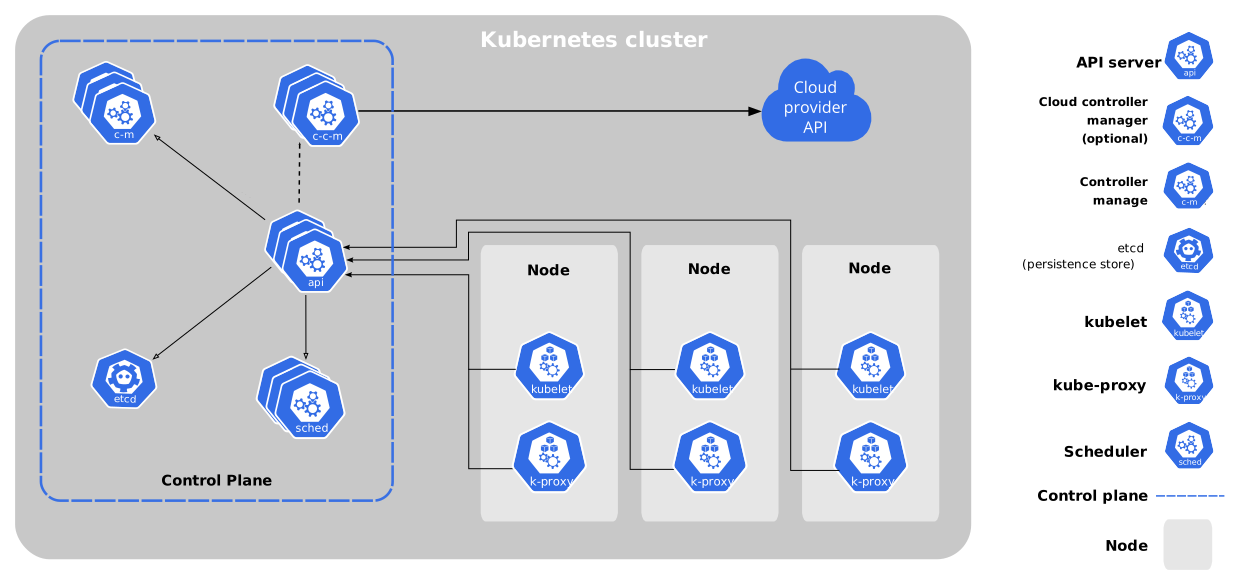
I. Control Plane Components
*
API server(kube-apiserver): The API server is a component of the Kubernetes control plane that exposes the Kubernetes API. The API server is the front end for the Kubernetes control plane.
- 作为Control plane的前端,是认证、授权、访问控制、API注册和发现等机制的统一入口,其中API为restful风格,同时交给etcd存储。
etcd: Consistent and highly-available key value store used as Kubernetes’ backing store for all cluster data.
- 一致且高度可用的键值存储,用作 Kubernetes 的所有集群数据的后台数据库。
scheduler(kube-scheduler): Control plane component that watches for newly created Pods with no assigned node, and selects a node for them to run on.
负责节点(Node)的调度与监控,职责为监控新创建的、未指定运行Node的 Pods,并选择Node来让 Pod 运行。
调度决策考虑的因素包括单个 Pod 及 Pods 集合的资源需求、软硬件及策略约束、 亲和性及反亲和性规范、数据位置、工作负载间的干扰及最后时限。
controller-manager
- kube-controller-manager: Control plane component that runs controller processes.
Logically, each controller is a separate process, but to reduce complexity, they are all compiled into a single binary and run in a single process.
- 用于处理集群中常规后台任务,一个资源对应一个控制器,这些控制器包括:
1
2
3
4
5
6
7
8
节点控制器(Node Controller):
负责在节点出现故障时进行通知和响应
任务控制器(Job Controller):
监测代表一次性任务的 Job 对象,然后创建 Pods 来运行这些任务直至完成
端点分片控制器(EndpointSlice controller):
填充端点分片(EndpointSlice)对象(以提供 Service 和 Pod 之间的链接)。
服务账号控制器(ServiceAccount controller):
为新的命名空间创建默认的服务账号(ServiceAccount)。
- cloud-controller-manager:
云控制器管理器允许用户将集群连接到云提供商的 API 之上, 并将与该云平台交互的组件同与用户的集群交互的组件分离开来。
- 与 kube-controller-manager 类似,cloud-controller-manager 将若干逻辑上独立的控制回路组合到同一个可执行文件中,以同一进程的方式运行。 用户可以对其执行水平扩容(运行不止一个副本)以提升性能或者增强容错能力。
1
2
3
4
5
6
节点控制器(Node Controller):
用于在节点终止响应后检查云提供商以确定节点是否已被删除
路由控制器(Route Controller):
用于在底层云基础架构中设置路由
服务控制器(Service Controller):
用于创建、更新和删除云提供商负载均衡器
2.Node
kubelet: An agent that runs on each node in the cluster. It makes sure that containers are running in a Pod.
- 管理本机容器一个集群中每个节点上运行的代理(agent, not proxy),它保证容器都运行在Pod中负责维护容器的生命周期,同时也负责Volume(CSI,容器存储接口) 和 网络(CNI,容器网络接口)的管理
kube-proxy: kube-proxy is a network proxy that runs on each node in your cluster, implementing part of the Kubernetes Service concept.
- 提供网络代理,负载均衡等操作
Container Runtime: Docker(Mainly)
- Docker、containerd、cri-o、rktlet以及任何实现Kubernetes CRI (容器运行环境接口) 的软件。
II. Kubernetes WorkLoads
Pods
Pods are the smallest deployable units of computing that you can create and manage in Kubernetes. - 是k8s中最小的单元
- 一组容器的集合
- 一个Pod中的所有容器共享同一网络
- 生命周期是短暂的(服务器重启后,就找不到了)
其中kubectl是Kubernetes集群的命令行接口, 假设一个demopod.yaml:
1 | apiVersion: v1 #kubeapi的版本 |
那么由该yaml启动pod的命令格式为
1 | kubectl [command] [TYPE] [NAME] [flags] |
组织形式
1Pod-1Container. 可以将 Pod 看作单个容器的包装器,并且 Kubernetes 直接管理 Pod,而不是容器。
1Pod-NContainer. A Pod can encapsulate an application composed of multiple co-located containers that are tightly coupled and need to share resources.
一个Pod可封装(encapsulate)由多个紧密耦合(coupled)且需要共享资源的容器组成的应用程序。Pod 将这些容器和存储资源打包为一个可管理的实体。
资源管理方式
Pod 被设计成支持形成内聚服务单元的多个协作过程,提供两种共享资源:网络,存储(Volume),使成员容器间能够进行数据共享和通信。
更新与替换 - Update & Replacement
当某Workload的 Pod Template被改变时,Controller会基于更新的模板创建新的 Pod对象,而不是对现有 Pod执行更新或者修补操作。
如果对Pod的某些字段执行 patch 和 replace 等更新操作,则有一些限制:
Pod 的绝大多数元数据都是不可变的。例如,用户不可以改变其 namespace、name、 uid 或者 creationTimestamp 字段;generation 字段是比较特别的, 如果更新该字段,只能增加字段取值而不能减少。
如果 metadata.deletionTimestamp 已经被设置,则不可以向 metadata.finalizers 列表中添加新的条目。
Pod 更新不可以改变除 spec.containers.image、spec.initContainers.image、 spec.activeDeadlineSeconds 或 spec.tolerations 之外的字段。 对于 spec.tolerations,用户只被允许添加新的条目。
在更新 spec.activeDeadlineSeconds 字段时,以下两种更新操作是被允许的:如果该字段尚未设置,可以将其设置为一个正数;
如果该字段已经设置为一个正数,可以将其设置为一个更小的、非负的整数。
其他
*生命周期*:
- Pending: 起始状态,
- Running: 至少有一个主要容器正常启动,进入Running
- Succeeded/Failed: 取决于 Pod 中是否有容器以失败状态结束
- Unknown: 因为某些原因, 无法取得 Pod 状态。这种情况通常是因为与 Pod 所在主机通信失败。
*Probe*:容器探针是由 kubelet 对容器执行的定期诊断。要执行诊断,kubelet 可以执行三种动作:
- ExecAction(借助容器运行时执行)
- TCPSocketAction(由 kubelet 直接检测)
- HTTPGetAction(由 kubelet 直接检测)
特权模式:在 Linux 中,Pod 中的任何容器都可以使用容器规约中的 安全性上下文中的 privileged 参数启用特权模式。
Static Pod:不通过API-server进行管理,直接由特定节点上的 kubelet 守护进程管理,通过 kubelet 直接监控每个 Pod,并在其失效时重启。并且不能引用其他的API对象。
Volume
Kubernetes 支持很多类型的卷:
- Volume声明在Pod容器中可访问的文件目录
- 一个Pod 可以同时使用任意数目的卷类型。
- 可以被挂载到Pod中一个或多个容器指定路径下-
- Pod 配置中的每个容器必须独立指定各个卷的挂载位置
- 支持多种后端存储抽象【本地存储、分布式存储、云存储】
- 临时卷类型的生命周期与 Pod 相同
- 对于给定 Pod 中任何类型的卷,在容器重启期间数据都不会丢失。
持久卷 Persistent Volume:是集群中的一块存储,可以由管理员事先制备, 或者使用存储类(Storage Class)来动态制备。
投射卷 Projected Volume:一个投射卷可以将若干现有的卷源映射到同一个目录之上
临时卷 Ephemeral Volume:有些应用程序需要额外的存储,但并不关心数据在重启后是否仍然可用。
缓存服务经常受限于内存大小,而且可以将不常用的数据转移到比内存慢的存储中,对总体性能的影响并不大。
另有些应用程序需要以文件形式注入的只读数据,比如配置数据或密钥。
Controller
将当前状态(Current State)更新为期望状态(Desired State)
确保预期的pod副本数量【ReplicaSet】
无状态应用部署【Deployment】,无状态就是指,不需要依赖于网络或者ip
有状态应用部署【StatefulSet】,有状态即需要满足特定的初始条件进行部署
确保所有的node运行同一个pod 【DaemonSet】
一次性任务和定时任务【Job和CronJob】
Deployment
Deployment 为 Pod 和其副本(ReplicaSet)提供声明式的更新。
- 用户负责描述 Deployment 中的 目标状态,(Controller) 以可控的速度更改实际运行状态(Current State), 使其变为期望状态(Desired State)。
创建Deployment
- 如下demodeployment.yaml,用户可以定义 Deployment 以创建新的 ReplicaSet,或删除现有 Deployment, 并通过新的 Deployment 分配其资源。
1
2
3
4
5
6
7
8
9
10
11
12
13
14
15
16
17
18
19
20
21apiVersion: apps/v1
kind: Deployment
metadata:
name: depName
labels:
app: nginx
spec:
replicas: 3
selector:
matchLabels:
app: nginx
template:
metadata:
labels:
app: nginx
spec:
containers:
- name: nginx
image: nginx:1.14.2
ports:
- containerPort: 80
该 Deployment 创建一个 ReplicaSet,包含3个Pod 副本。
同样通过kubectl运行:
1 | $ kubectl apply -f demodeployment.yaml |
- NAME 列出了名字空间中 Deployment 的名称。
- READY 显示应用程序的可用的“副本”数。显示的模式是“就绪个数/期望个数”。
- UP-TO-DATE 显示为了达到期望状态已经更新的副本数。
- AVAILABLE 显示应用可供用户使用的副本数。
- AGE 显示应用程序运行的时间。
更新/回滚/缩放/暂停 Deployments
先来更新上述Pod的container,以使用 nginx:1.16.1 镜像,而不是 nginx:1.14.2 镜像。命令格式如 1
2
3
4
5
6
7
8
9
10
11
12
13```bash
# 创建
$ kubectl set image deployment/depName nginx=nginx:1.16.1
output: deployment.apps/depName edited
# 查看deployment的details
$ kubectl describe deployments
# 查看上线状态
$ kubectl rollout status deployment/depName
output:
1. Waiting for rollout to finish: 2 out of 3 new replicas have been updated...
2. deployment "depName" successfully rolled out
# 查看更新后的pod states
$ kubectl get pods
回滚操作和git的回滚操作类似
1 | # 检查deployment修改历史 |
缩放deployment,即更新replicas,让rs的副本增加或减少
1 | # 定量缩放,比如replicas由3变5个 |
同时具有比例缩放特性 Proportional scaling
//TODO::命令设置
暂停deployment
1 | $ kubectl rollout pause deployment/depName |
Service
- Service定义了一组pod的访问规则(An abstract way to expose an application running on a set of Pods as a network service.)
- Pod的负载均衡,提供一个或多个Pod的稳定访问地址
- 支持多种方式【ClusterIP、NodePort、LoadBalancer】
In Kubernetes, a Service is an abstraction which defines a logical set of Pods and a policy by which to access them (sometimes this pattern is called a micro-service). The set of Pods targeted by a Service is usually determined by a selector.
服务发现
- Service in Kubernetes is a REST object, similar to a Pod. Like all of the REST objects, you can POST a Service definition to the API server to create a new instance.
- 用户想要在应用程序中使用 Kubernetes API 进行服务发现,则可以查询 API 服务器用于匹配 EndpointSlices:只要服务中的 Pod 集合发生更改,Kubernetes 就会为服务更新EndpointSlices。
定义一个demoservice.yaml
1 | apiVersion: v1 |
Ingress
- 首先,Ingress是公开从集群外部到集群内服务的 HTTP 和 HTTPS 路由。 流量路由由 Ingress 资源上定义的规则控制。
- Ingress 是对集群中服务的外部访问进行管理的 API 对象,典型的访问方式是 HTTP。
- Ingress 可以提供负载均衡、SSL 终结和基于名称的虚拟托管。
- An Ingress controller is responsible for fulfilling the Ingress, usually with a load balancer.
1 | apiVersion: networking.k8s.io/v1 |

